
Download PoemGeneratorAI – Free AI Poetry Generator, Multilingual, Online Tool
Overview
PoemGeneratorAI is a free, web‑based application that turns a simple idea into a polished rhyming poem within seconds. Powered by the latest ChatGPT language model, the tool understands context, tone, and thematic cues, delivering verses that feel both natural and inspired. Whether you are a casual lover of poetry, a teacher looking for classroom prompts, or a professional writer seeking fresh sparks, PoemGeneratorAI offers an intuitive playground where creativity flows without the need for technical expertise.
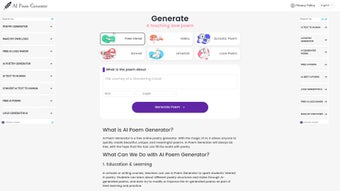
The interface is deliberately minimalistic: a single text box for your theme, a language selector, and two clear buttons—“Generate Random Poem” and “Create Custom Poem.” After a few keystrokes, the AI crafts a stanza that respects your chosen language and desired rhyme scheme. While the service focuses on rhyme, it also subtly incorporates imagery, metaphor, and rhythm, making each output feel more like a handcrafted piece than a generic algorithmic dump. The platform’s multilingual support—English, French, Russian, Italian, German, Spanish, and Portuguese—opens doors for non‑English speakers and encourages cross‑cultural poetic exchange.
Although PoemGeneratorAI does not currently allow fine‑tuned control over meter or collaborative editing, its speed, accessibility, and free pricing model make it an attractive first stop for anyone eager to explore AI‑assisted verse creation.
Key Features and How to Get Started
- AI‑Driven Rhyme Generation: Utilises OpenAI’s ChatGPT to produce coherent, rhyming lines that match your theme.
- Multilingual Support: Write poems in English, French, Russian, Italian, German, Spanish, or Portuguese with a single click.
- Random Poem Mode: Click “Generate Random Poem” for instant inspiration without any input required.
- Custom Theme Input: Provide a keyword, phrase, or brief description to tailor the poem to your needs.
- Instant Web Access: No download or installation—just open the site in any modern browser.
- Responsive Design: Optimised for desktops, tablets, and smartphones, ensuring a smooth experience on Windows, macOS, Linux, Android, and iOS devices.
- Secure & Free: The service is completely free to use and operates over HTTPS, protecting your data during the generation process.
- Export Options: Copy the poem to clipboard or download it as a plain‑text file for later editing.
Installation & Usage Instructions
Getting started with PoemGeneratorAI is as simple as opening a web browser. Follow these steps for a frictionless experience:
- Open the website: Navigate to poemgeneratorai.example.com. The homepage loads instantly on all major browsers (Chrome, Edge, Firefox, Safari).
- Select your language: Use the dropdown menu at the top‑right corner to choose the language you want the poem in.
- Choose a mode: Click “Generate Random Poem” for a surprise, or enter a keyword/phrase in the input field for a custom creation.
- Press “Create Custom Poem”: The AI begins processing; results typically appear within 2‑5 seconds.
- Review and refine: If the output needs minor tweaks, edit the text directly in the result box or click “Regenerate” for a fresh version.
- Save your work: Use the “Copy” button to place the poem on your clipboard or click “Download” to store a .txt file on your device.
- Share: The platform includes social icons that let you share your poem directly to Twitter, Facebook, or Instagram.
The entire workflow is designed for speed and simplicity, meaning you spend more time enjoying the poetry and less time learning a new tool. Because it runs entirely in the cloud, there are no updates to manage—PoemGeneratorAI is continuously improved on the server side, ensuring you always have the latest AI capabilities without lifting a finger.
Compatibility, System Requirements, and Performance
PoemGeneratorAI is a web‑based service, which makes it inherently cross‑platform. As long as you have a modern, standards‑compliant browser, the tool works flawlessly on Windows 10/11, macOS Ventura and later, popular Linux distributions (Ubuntu, Fedora, etc.), as well as mobile operating systems such as Android 8.0+ and iOS 13+. The responsive design adapts the layout to fit any screen size, so you can compose poetry on a desktop monitor, a 13‑inch laptop, a tablet, or even a smartphone without loss of functionality. Because all processing occurs on the provider’s servers, the client device only needs a stable internet connection (broadband or 4G/5G) and a minimum of 2 GB RAM for smooth interaction. No additional plugins, extensions, or heavyweight software installations are required.
Pros
- Zero‑cost access: Completely free with no hidden fees or subscription traps.
- Instant multilingual output: Switch languages on the fly, making it ideal for language learners and international creators.
- Fast generation: Poems appear in under five seconds, keeping the creative flow uninterrupted.
- Secure connection: HTTPS encryption safeguards your input and generated text.
- Minimalist UI: The clean design reduces distractions and lets you focus on the words.
- Cross‑device compatibility: Works equally well on desktops, laptops, tablets, and smartphones.
- Continuous server‑side updates: Improvements to the underlying AI model are delivered automatically.
Cons
- No meter control: While the tool excels at rhyme, it cannot enforce specific poetic meters (iambic pentameter, etc.).
- Lack of collaborative editing: Multiple users cannot edit the same poem in real time.
- Dependence on internet: Offline use is not possible because generation happens on remote servers.
- Limited formatting options: Output is plain text; advanced styling or export to PDF must be handled externally.
- Potential for generic phrasing: In rare cases, the AI may produce clichés if the input is overly vague.
Frequently Asked Questions
Is PoemGeneratorAI really free to use?
Yes, the entire service is offered at no cost. There are no subscription tiers or hidden charges, and you can generate an unlimited number of poems each day.
Do I need to create an account to generate poems?
No account is required. Simply visit the website, choose your language, enter a theme (or leave it blank for a random poem), and click the generate button.
Can I use PoemGeneratorAI on my mobile phone?
Absolutely. The responsive design works on Android and iOS browsers, giving you the same functionality as on a desktop computer.
How does the AI handle different languages?
The underlying ChatGPT model has been trained on multilingual data, allowing it to understand prompts and produce rhyming verses in all seven supported languages while preserving idiomatic expressions.
Is my input data stored or shared?
All requests are transmitted over HTTPS and processed anonymously. The service does not retain personal data beyond the brief period needed to generate the poem, and no information is sold to third parties.
Conclusion – Why You Should Download PoemGeneratorAI Today
PoemGeneratorAI stands out as a fast, free, and multilingual solution for anyone who wants to dip a toe into AI‑assisted poetry or accelerate the creative process. Its clean interface eliminates the learning curve typical of more complex writing tools, while the underlying ChatGPT engine guarantees that each output feels fresh and linguistically coherent. Even though the platform lacks advanced meter control and collaborative features, its strengths—speed, language versatility, and zero‑cost accessibility—make it an indispensable companion for educators, students, lyricists, and casual verse enthusiasts alike. Ready to see what your imagination can become with a little AI boost? Visit PoemGeneratorAI now, type a theme, and let the rhymes flow instantly. Your next poem is just a click away.



.png)



